
Bending the Cost Curve
7 Proven Ways Microsoft AI Reduces Software Development Costs
Every organization is looking to trim costs while staying innovative. While there are opportunities to save, we need to ask which ones yield quick wins and which require more effort and action.
This white paper explores how AI technology brings significant cost-savings and time-savings, including all the ways Microsoft AI can help you.
Contents
1. Introduction
2.Traditional Software Development Costs
3. Bending the Cost Curve with Microsoft AI
4. 7 Proven Ways to Optimize Costs with Microsoft AI
- Accelerate Development with AI-Assisted Code Generation
- Enhance Code Quality with Automated Testing
- Optimize Infrastructure Costs with Intelligent Scaling
- Reduce Time Spent on Bug Fixes with AI-Powered Error Analysis
- Improve Developer Productivity through AI-Powered Collaboration
- Reduce Custom Development with Pre-Built AI Services
- Streamline Security and Compliance with AI-Powered Solutions
5. Move from Experimentation to Implementation
6. Meet with Our AI Experts

Introduction
Cost rules in enterprise software. There’s no business today that isn’t on a mission to curtail costs. IT budgets, in particular, are under constant scrutiny as CIOs look for ways to dial back on expenses.
Faced with macroeconomic headwinds and mixed economic signals, they’re taking a harder look at the return on investment.
However, cutting costs does not mean cutting corners. Sometimes, all it takes is using the right tools and resources. Other times, it’s about streamlining processes and setting your team up
for success. For example, you might be paying for software you don’t need or using outdated systems that are slowing you down. Or maybe inefficient workflows are causing delays and driving up costs.
The good news is that newer technologies like generative artificial Intelligence (Gen AI), machine learning (ML), and natural language processing (NLP) offer a silver lining. They’re the biggest technology shift we’ve seen in software development after cloud and DevOps.
This new wave of AI technologies promise to rewrite the way software is built and maintained. If it does, software development will undergo a massive transformation — with big implications for how developers work and how companies build, maintain, and optimize the code powering their organizations. This new era of AI will herald change as big as the Agile development movement, transforming how organizations respond to evolving software requirements and customer feedback.

The future of software the development will be deeply influenced by AI, with the potential to disrupt traditional development practices and unlock new levels of efficiency and innovation.”
Andrew Ng,
Generative AI is new —but gaining momentum faster than anyone imagined. There’s no ignoring the possibilities and cost-efficiencies it brings to software development. Look what’s happening with GPT-4o. It suggests software code and entire functions based on natural language prompts. Still, we believe the most valuable use for generative AI is training it on an organization’s proprietary source code and technical documentation. Then, “fine tuning” it in a way that produces massive productivity gains while reducing the cost of creating and maintaining software.
Before we dive into all the ways generative AI reduces software development costs, let’s examine what it costs to develop software in 2024—and what it takes to keep those costs down.
Traditional software development costs widely differ depending on several factors, but here’s a general breakdown:
Project Type
What does your software project entail—simple apps with basic features or complex enterprise software with robust features, add-ons, and security? Your software project’s size, type, and scope impacts development costs. The more attributes and features, the higher the costs. If you’re building from scratch, it would cost you more compared to tweaking existing software—assuming your current software is well-architected, your tech stack is up to date, and scalable. However, in many cases, it becomes more cost-effective to rewrite than maintain and update existing software. SaaS projects, due to their complexity also cost more.
Complexity
That brings us to the next critical factor—complexity. Project size isn’t always an accurate measure of complexity. Large projects can be simple—although large projects tend to be fairly more complex—and small projects, complex. The intricacy of features and requirements drives the challenge, not necessarily the scale.
Time to Market
Time to market (TTM) is the time it takes to get a product, service, or solution from the drawing board into the hands of users. It could take anything from a couple months to five years, depending on its level of difficulty. For example, the first version of Airbnb launched in just 10 months. You’ll find TTM is directly proportional to the cost and revenue associated with any software development process. The longer it takes to develop software, the more it costs down the road. On the other hand, early releases can help you get valuable feedback from your customers, which helps shape the future of the product, increase profits, and keep costs down. That’s why Minimal Viable Products (MVP) are the new standard in taking a new product to market.
External Systems & APIs
Most of the software you see today are connected to external systems and application programming interfaces (APIs). For example, features such as mapping and geolocation run external to the app but are there when the user needs them. Security, data encryption, and protection though invisible to the user are critical to your product or software. Integrating external systems and APIs although necessary adds to the backend complexity and cost. Despite their expense, they’re essential for a successful product.
Expertise
The expertise you employ affects project costs. Complex projects require senior developers, pushing up costs. The size and roles within your team—from project managers and solution architects to developers and testers—will vary by project but increase costs depending on experience and project scope.
Bending the Cost Curve with Microsoft AI
Generative AI has opened the doors for developers to do things that were previously impossible. We know by now how AI coding assistants like GitHub Copilot do everything from helping developers with drudge work all the way to producing entire codebases from brief prompts. In fact, GitHub found that developers who used an AI coding assistant worked 55% faster than those who didn’t.
By 2028, according to a Gartner poll, 75% of software engineers will be using generative AI code assistants. This means more time savings—and cost savings—for organizations and IT teams.
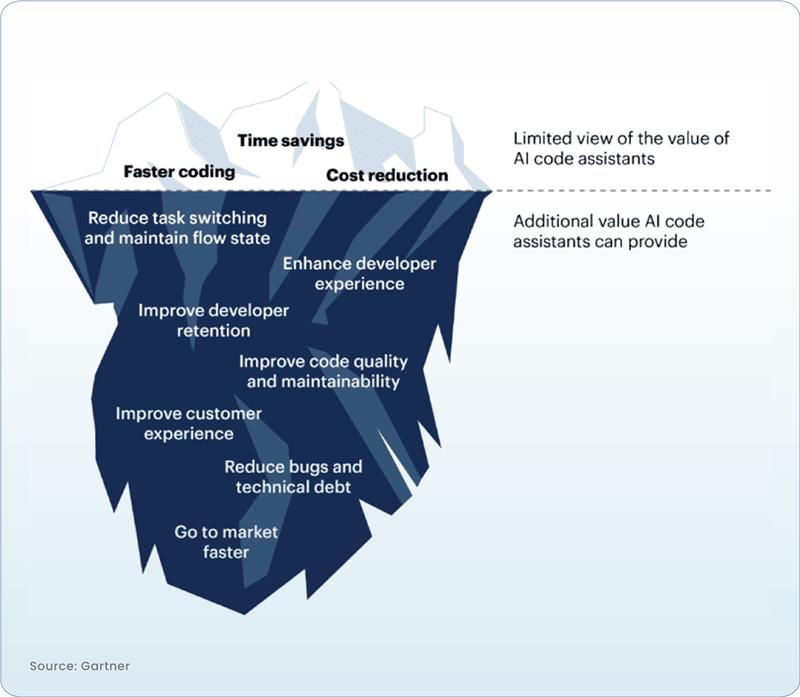
By bringing AI to your developers, you can simplify software development and reduce costs while reaping the following benefits:
1. Accelerate Development with AI-Assisted Code Generation
Need to add new features or make major changes to your software—fast? With AI, you’re in good hands. AI tools help you rapidly onboard large groups of developers and get them up to speed quickly. In fact, a McKinsey study shows that software developers can complete coding tasks up to twice as fast with generative AI, without sacrificing quality.
Your code won’t compile again? Developers everywhere have days when they’re wondering, “Why is this thing not working?” And then, may have to consult with a more senior developer who points them in the right direction. With AI assistants like GitHub Copilot, all you have to do is ask and it will explore alternative solutions, offering options into what’s possible.
Copilot provides guidance on which classes or libraries of code have the necessary functionality to implement specific requirements. It suggests code based on context and analyzes your code for vulnerabilities. Copilot even debugs code across languages—from Java to C++—based on the prompt you enter.
AI Tools
GitHub Copilot,
Azure OpenAI
How It Helps
AI-assisted code generation speeds up the coding process by generating code snippets, reducing manual work, and reducing errors.
Cost Reduction Impact
Fewer development hours, lower debugging costs, and faster time-to-market.
2. Enhance Code Quality with Automated Testing
The benefits extend beyond just code generation. AI plays a crucial role in bug detection, prevention, fixes, and automated testing. It identifies
potential bugs early in the development process, reducing the time spent on debugging while improving the developer experience. AI-driven test
generation, execution, and static analysis tools contribute to faster release cycles and more reliable software.
AI Tools
Azure DevOps, Azure Pipelines, Test Plans, AI-driven test case generation
How It Helps
AI can automate testing and improve the precision of test cases, catching bugs early and ensuring higher quality in production.
Cost Reduction Impact
Reduces expensive post-deployment fixes and QA hours.
3. Optimize Infrastructure Costs with Intelligent Scaling
AI-powered tools have the ability to monitor real-time demand and predict usage based on historical data, intelligently scaling resources up (or down) accordingly. Such dynamic scaling helps you avoid paying for resources you don’t need, cutting costs while making sure your infrastructure runs efficiently without losing performance.
By integrating intelligent scaling and AI, you can also identify areas of waste—such as underused servers or redundancies—and adjust configurations to better suit actual needs
AI Tools
Azure Cost Management + AI, Azure Monitor, Azure Advisor
How It Helps
Microsoft AI tools can analyze usage patterns and recommend optimized scaling, ensuring that cloud infrastructure is right-sized for application needs.
Cost Reduction Impact
Prevents over-provisioning, optimizing cloud spend by scaling up or down as needed.
4. Reduce Time Spent on Bug Fixes with AI-Powered Error Analysis
A better customer experience begins the moment development checks in their code. By optimizing CI/CD pipelines, automating tasks like code deployment, testing, and monitoring, AI enables you deploy software faster.
Clean code devoid of human errors improves the overall quality of the software, cutting down on rework and post-launch fixes, which are expensive and time-consuming. By analyzing large codebases, generative AI helps software development teams to identify and fix bugs automatically.
AI Tools
Azure Monitor, Azure AI anomaly detection
How It Helps
AI can rapidly analyze error logs, identify anomalies, and pinpoint the root cause of bugs, helping developers fix issues faster.
Cost Reduction Impact
Minimizes developer time spent on debugging and lowers operational downtime.
5. Improve Developer Productivity through AI-Powered Collaboration
According to McKinsey, there are several “low hanging fruit” use cases where AI can drastically speed up developer productivity.
Coding often involves tasks that are simple yet tedious, and this is where generative AI shines. Repetitive, routine work like typing out standard functions can be expedited with auto-complete features. Tools like OpenAI’s Codex even suggests lines of code or entire functions based on natural language descriptions. Documentation becomes faster and easier too, as AI helps developers stick to specific formats. Natural Language Processing (NLP) takes it a step further, allowing developers to interact with development environments, debugging, and version control systems using everyday language. Beginners can also tap into Generative AI for context, explanations, and guidance as they write code, which speeds up learning and opens the door to software development for more people.
AI Tools
Microsoft Teams + AI,
Azure DevOps, GitHub
How It Helps
AI-enhanced tools improve communication and collaboration by automating workflows, managing tasks, and providing insights on team productivity.
Cost Reduction Impact
Increases overall developer output while minimizing time lost in coordination and administrative overhead.
6. Reduce Custom Development with Pre-Built AI Services
Developers don’t have to build code from scratch every single time. With out-of-the-box AI applications and customizable APIs and pre-built models, developers can embed AI in applications and their business operations. The models can be custom trained for more accurate results and different teams across the organization can reuse the models, data sets, and data labels across services. If developers wish, they could easily add machine learning to apps without slowing application development.
AI Tools
Azure Cognitive Services, Azure Machine Learning
How It Helps
Instead of building custom AI models from scratch, businesses can leverage pre-built AI services to integrate capabilities like NLP, image recognition, and language translation directly into applications.
Cost Reduction Impact
Saves on R&D costs, as teams use pre-trained models and services to meet common business
requirements.
7. Streamline Security and Compliance with AI-Powered Solutions
AI Tools
Microsoft Sentinel, Azure Security Center, Azure Purview
How It Helps
AI-driven security tools continuously monitor and analyze threats, compliance risks, and anomalies, allowing for faster response times.
Cost Reduction Impact
Lowers security-related incidents, reducing legal and regulatory costs while minimizing
damage from potential breaches.
Move from Experimentation to Implementation
Thus far, you’ve only seen the tip of the cost-optimization iceberg. There’s so much more value AI brings to software development. AI will soon become an indispensable addition to your data and advanced analytics toolbox. Even if you think the technology isn’t mature enough in its current state, doing proofs of concept now to become familiar with the technology will help you respond quickly to newer, more advanced models.
As a Microsoft partner with over 25 years of experience driving digital transformation, we are uniquely positioned to help your organization leverage AI to transform software development and maintenance. Drawing on our deep expertise in artificial intelligence, machine learning and natural language
processing, we can guide your organization through strategy development, platform selection, implementation, and ongoing support, including the embrace of responsible AI practices to unlock new growth and reduce costs. The future of software development cost optimization never looked brighter.
Meet with our AI Experts

Jason Milgram
Senior Vice President, Azure Leader
Fourteen-time Microsoft Azure MVP, Jason is a proven leader in Azure cloud computing and AI with more than 25 years of experience helping clients create exceptional customer experiences through technology and innovation. In 1997, he worked on a groundbreaking project with the U.S. Department of Justice related to a WWII-era legal case, where he integrated an AI solution into Lotus Notes/Domino so when searching through millions of scanned and OCR’ed documents for the case, users could specify the meanings of words they were looking for—such as distinguishing between “ruler” as a leader versus a measuring tool. As an Azure Leader, Jason leads a global team of technology professionals to deliver cutting-edge Microsoft solutions. Jason is also the co-author of the Microsoft Azure Strategy and Implementation Guides, a series that provides practical guidance and best practices for Azure adoption and optimization.

Pablo Piovano
Director, AI & Cloud Services, Microsoft AI MVP
As a three-time Microsoft MVP in AI, Pablo is passionate about applying artificial intelligence and machine learning solutions to transform our clients’ businesses, and implement, and oversee AI solutions. From strategy and implementation to support and maintenance, Pablo ensures our AI initiatives align with our client’s goals, improve customer experiences, and drive new revenue streams.
For more information on how AI can transform your business, click here